zibajoonZIBAJOON.COM/ONEROOF
GITHUB ↗ DOWNLOAD
v0.3.0 is out · free and open source

The terminal was built for one session. You're running twenty.

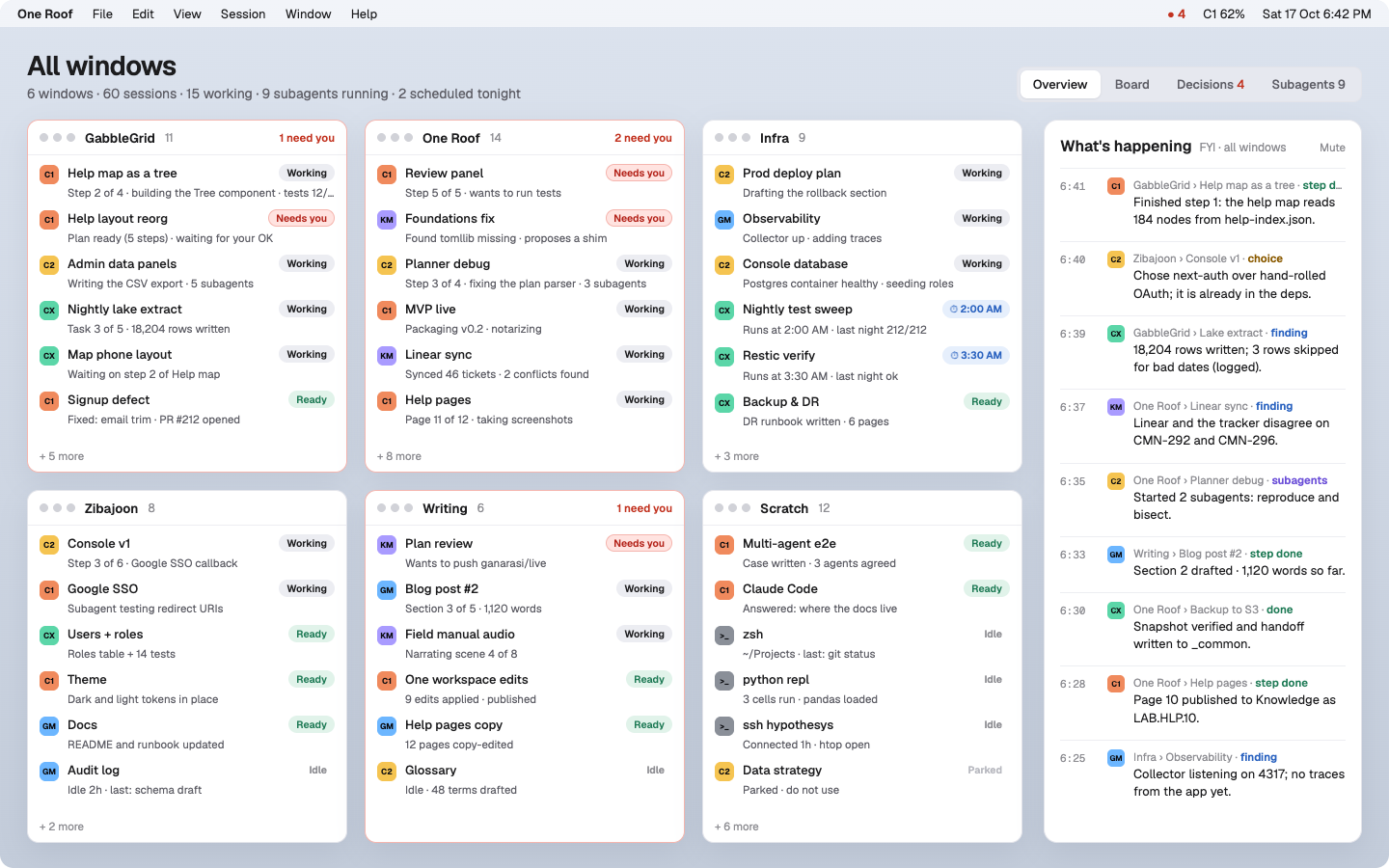
One Roof is a Mac app that sits between a consumer app and a terminal. Every Claude Code, Codex, Kimi, Gemini and Antigravity session you have running, on every subscription, is in one place. Each session says in plain words what it's doing, and your rules plus each subscription's remaining usage decide which agent and account takes the next task.

Open source · MITNative macOS appmacOS 14 or laterOne download, plus herdr and your agents
One Roof Overview: six windows of sessions with a live feed
Side by side Claude Code Codex Kimi Gemini Antigravity

Your subscriptions, detected. Up to two Claude accounts and one of each other agent, detected automatically. Claude and Codex show live usage, and new sessions go to the seat with room.

Why we built it

10× doesn't come from typing faster. It comes from running more at once.

Agents don't run your work for you. A few tasks will run on their own, but deep, detailed work still needs a person: setting direction, answering questions, checking the result. What's changed is how many things need you at once. You're running several, and you switch between them all day.

The terminal comes from a world of one session, maybe two, and it gets hard to read the moment you have ten.

Warp made it a little easier, but it's still a terminal: the same tab bar and the same wall of text. People new to engineering find that wall hard to work in.

One Roof is built to make that switching easy. Glance at a session, see where it is, decide and move on. It brings the terminal to the consumer world with labels, colours, plain-language summaries and one place for every decision, and keeps a real terminal underneath.
Why it exists

A terminal was built for one person typing. You're running a fleet.

Six windows of ten or fifteen sessions each, spread across five agents and several accounts. Here's what goes wrong, and what One Roof does about each one.

The tour

Nine screens, one terminal at the centre. You saw the Overview above; here's the rest.

Session

Read the summary, not the stream.

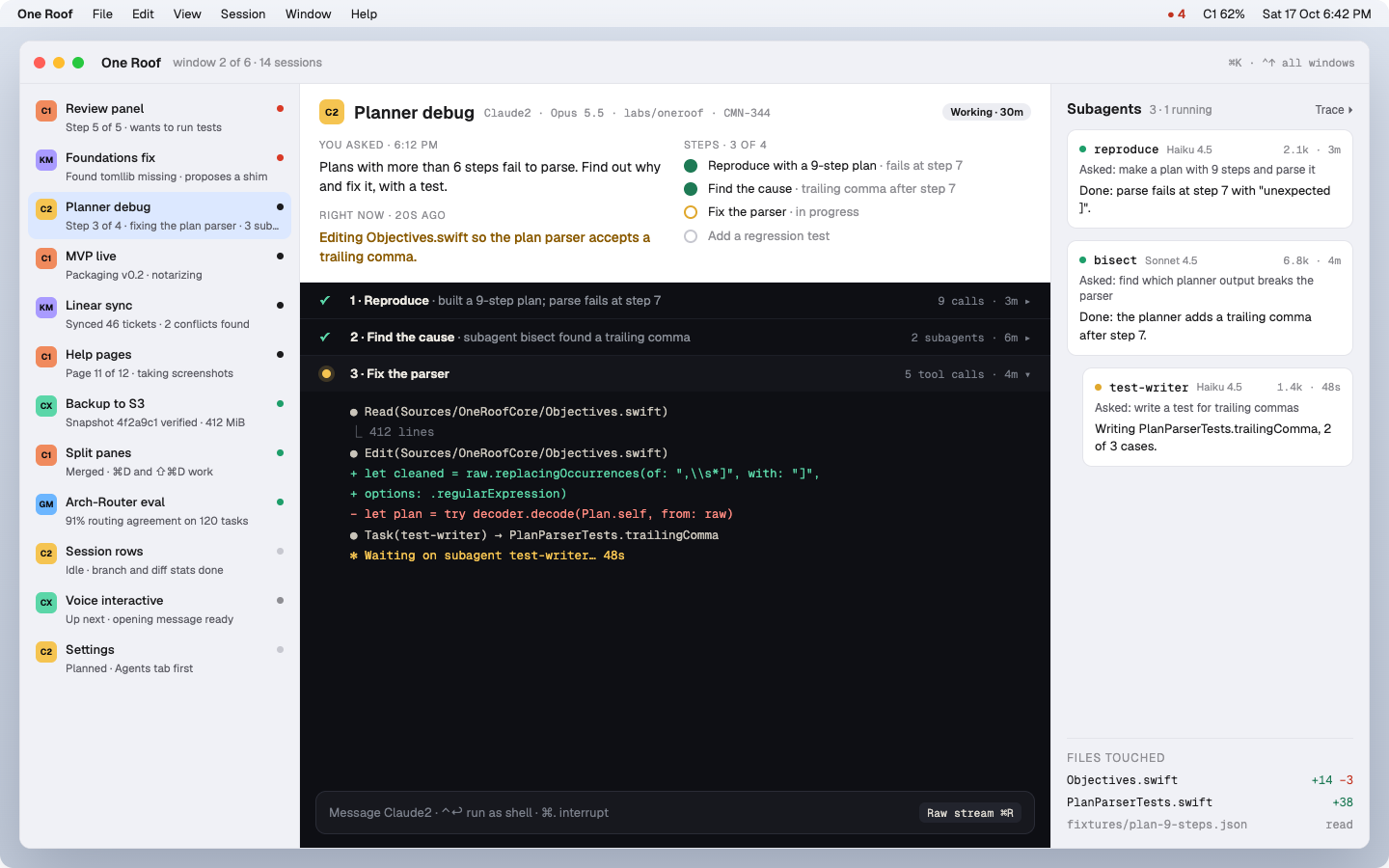
At the top: what you asked, what it's doing right now, and steps 3 of 4. Finished steps fold into one-line chapters, and the live step stays a real terminal. Subagents sit beside it with their own captions. Press ⌘R for the raw stream.

Session summary and chapters
Decisions · ⌘I

Approve with the reason in front of you.

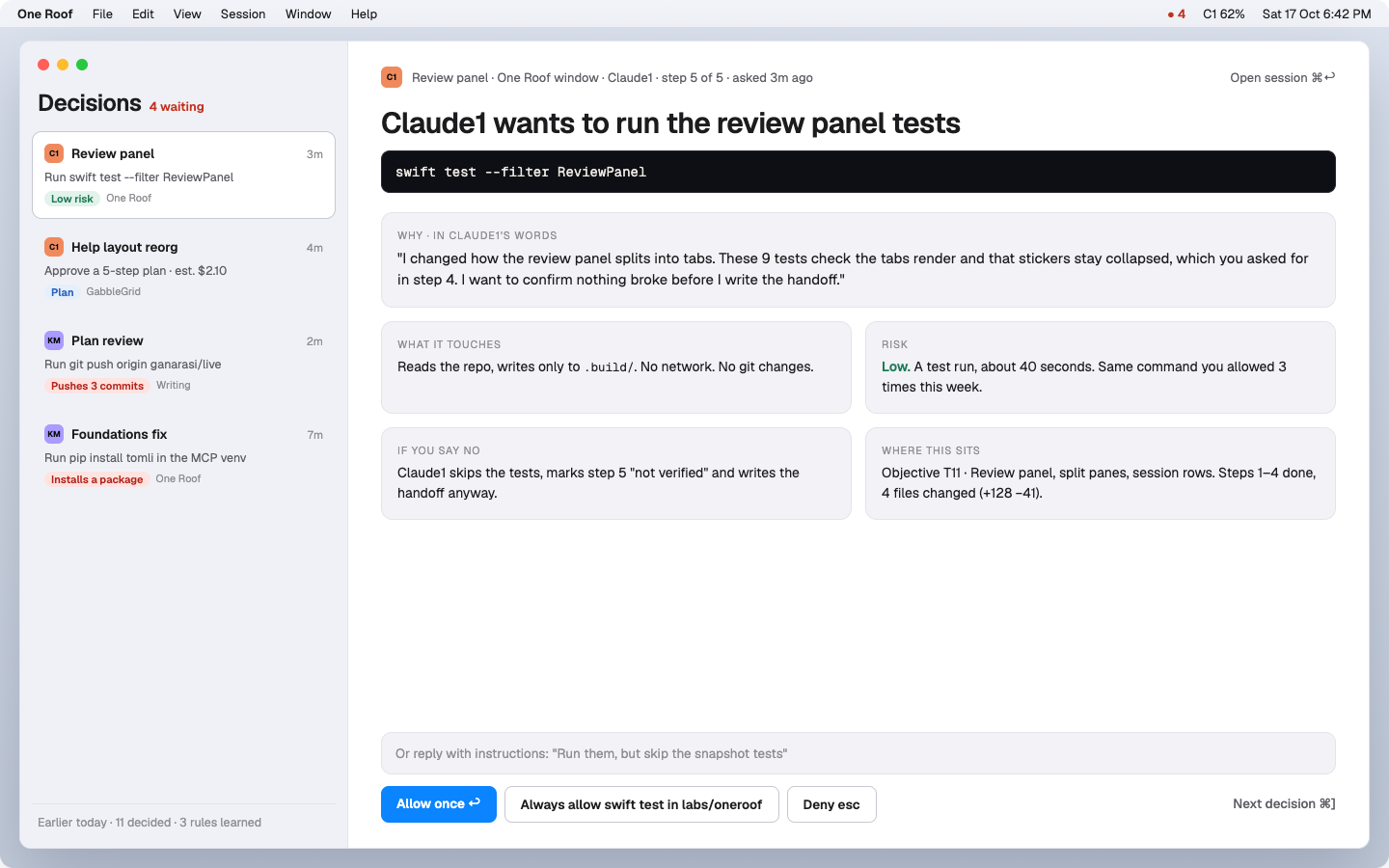
Every agent waiting on you, oldest first. Each request shows why the agent wants to do it, in its own words, plus what it touches, the risk, what happens if you say no, and where it sits in the plan. Allow once, always allow, deny, or reply with instructions. You stay in the loop; nothing is approved for you.

Decisions
Board · ⌘B

Plan your day by dragging cards.

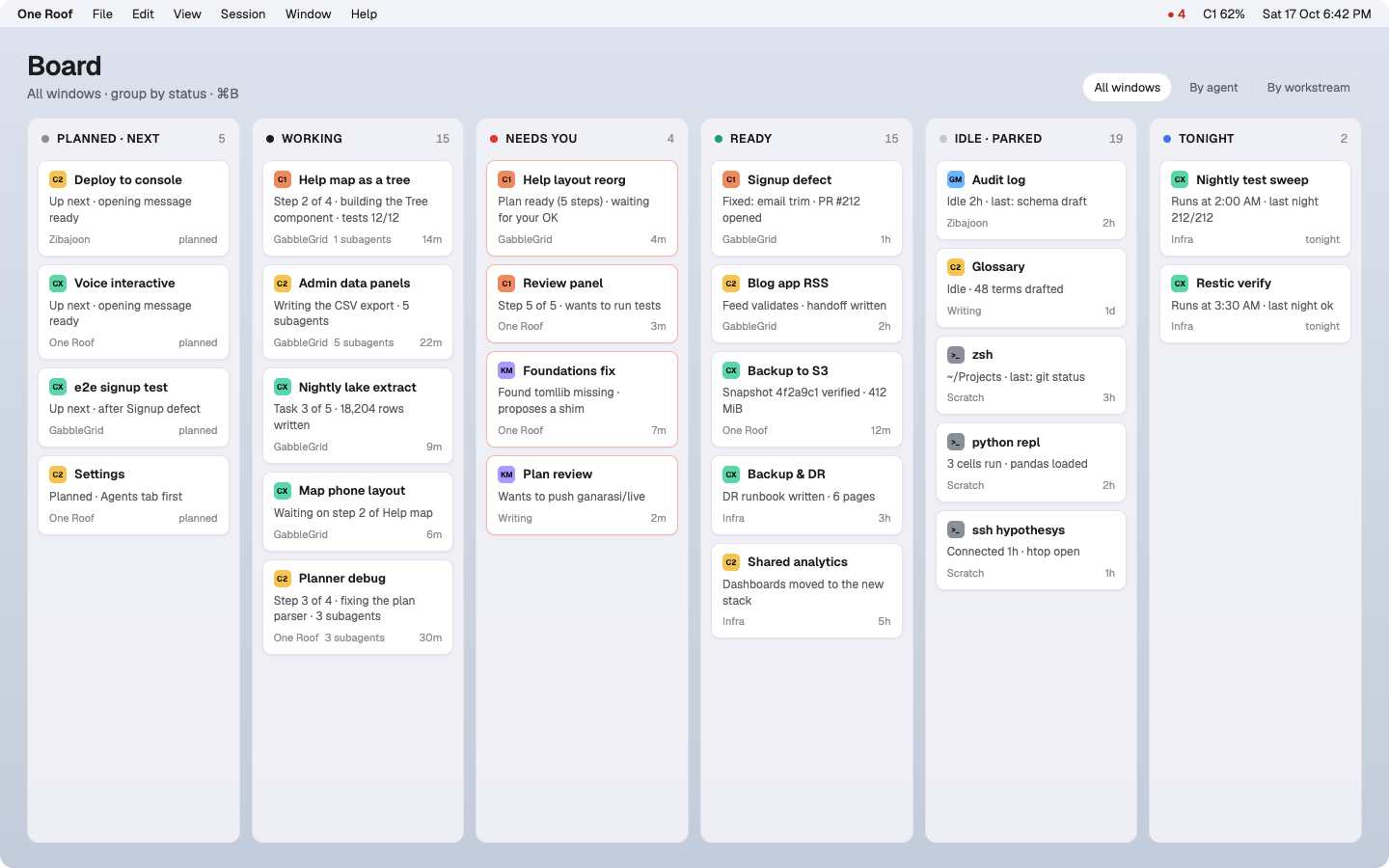
Planned, Next, Working, Needs you, Ready, Tonight: every session across every window on one board. Drag a card to Next, or drop it on Tonight to run at 2 AM, nightly, or on demand.

Board
Subagents · ⇧⌘A

See the agents your agents start.

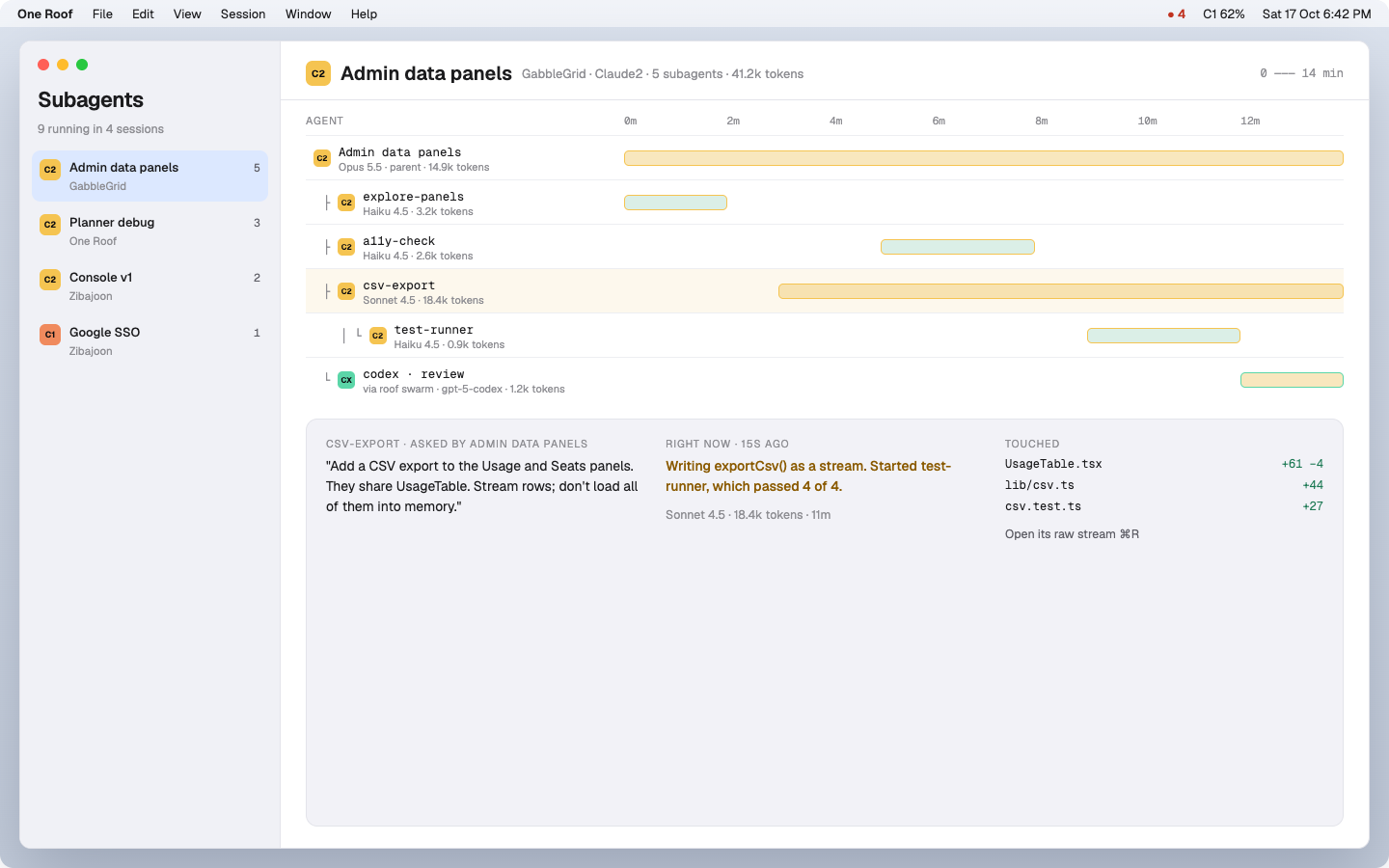
A timeline of every subagent: who asked it what, the model it runs on, tokens used, how long it took, and what it's doing right now. Parallel swarms show up with their own agent's colour.

Subagents trace
Routing · your rules, an optional on-device model

The app picks the agent, account and model.

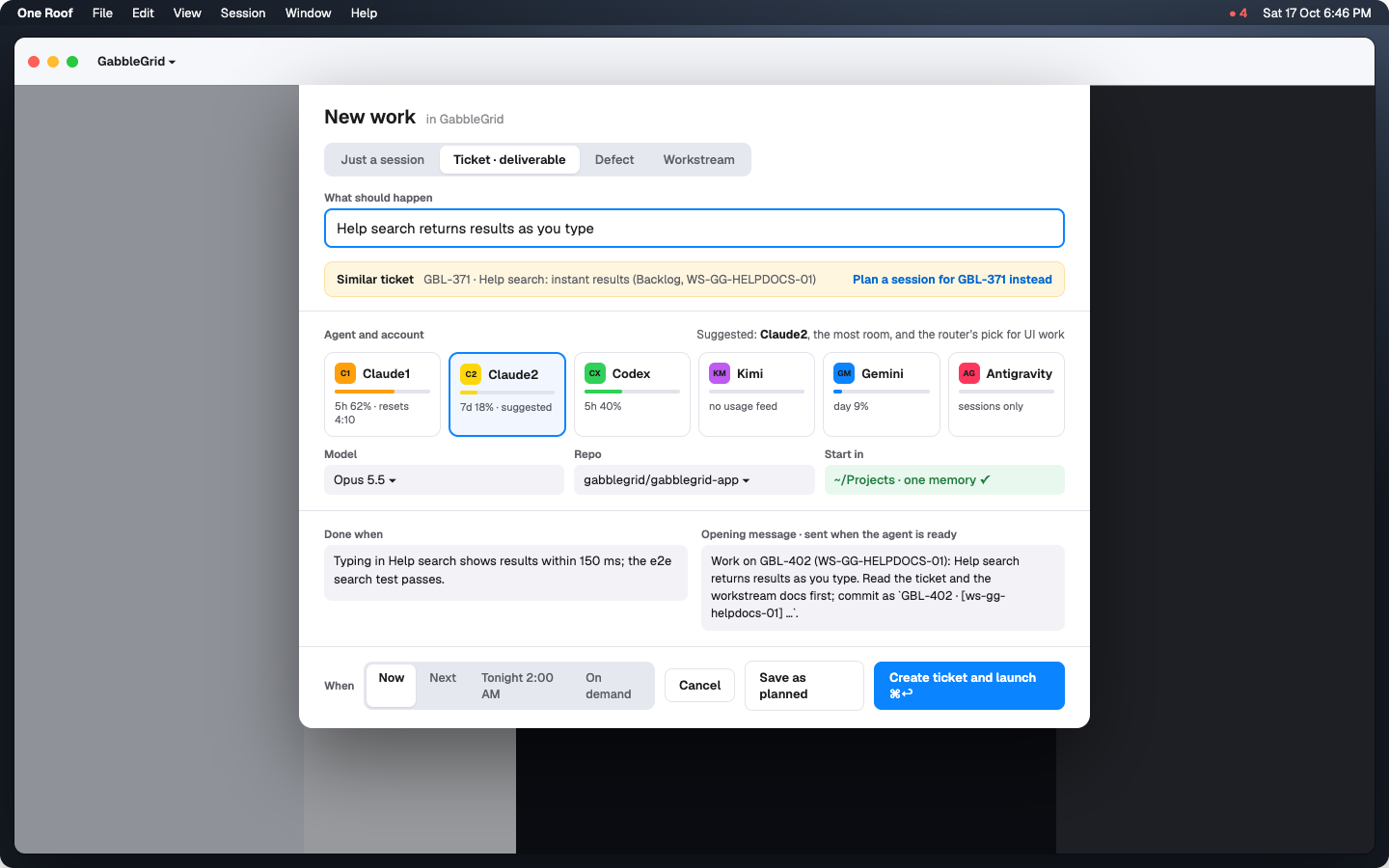
Your routing rules rank the agents for each kind of task, and One Roof checks each subscription's remaining usage, then suggests the agent, account and model. An optional small language model runs on your Mac, not in the cloud, and labels each task plan, build, review, research or chore in about 0.2 seconds. You approve it. When a seat nears its limit, the step hands off to the next one with a handoff note.

1What kind? Your plan says, or the optional on-device model classifies it.
2Who should? Your rules rank the agents for that kind.
3Who can? Usage left on each of your subscriptions.
New session · ⌘N

Say what should happen. It works out who does it.

One Roof works out whether this is a session, a ticket, a defect or a workstream, finds similar tickets, and puts the router's suggestion on top with its reason. Launch now, queue it next, or schedule it for tonight.

New session sheet with the router's suggestion
Workspace

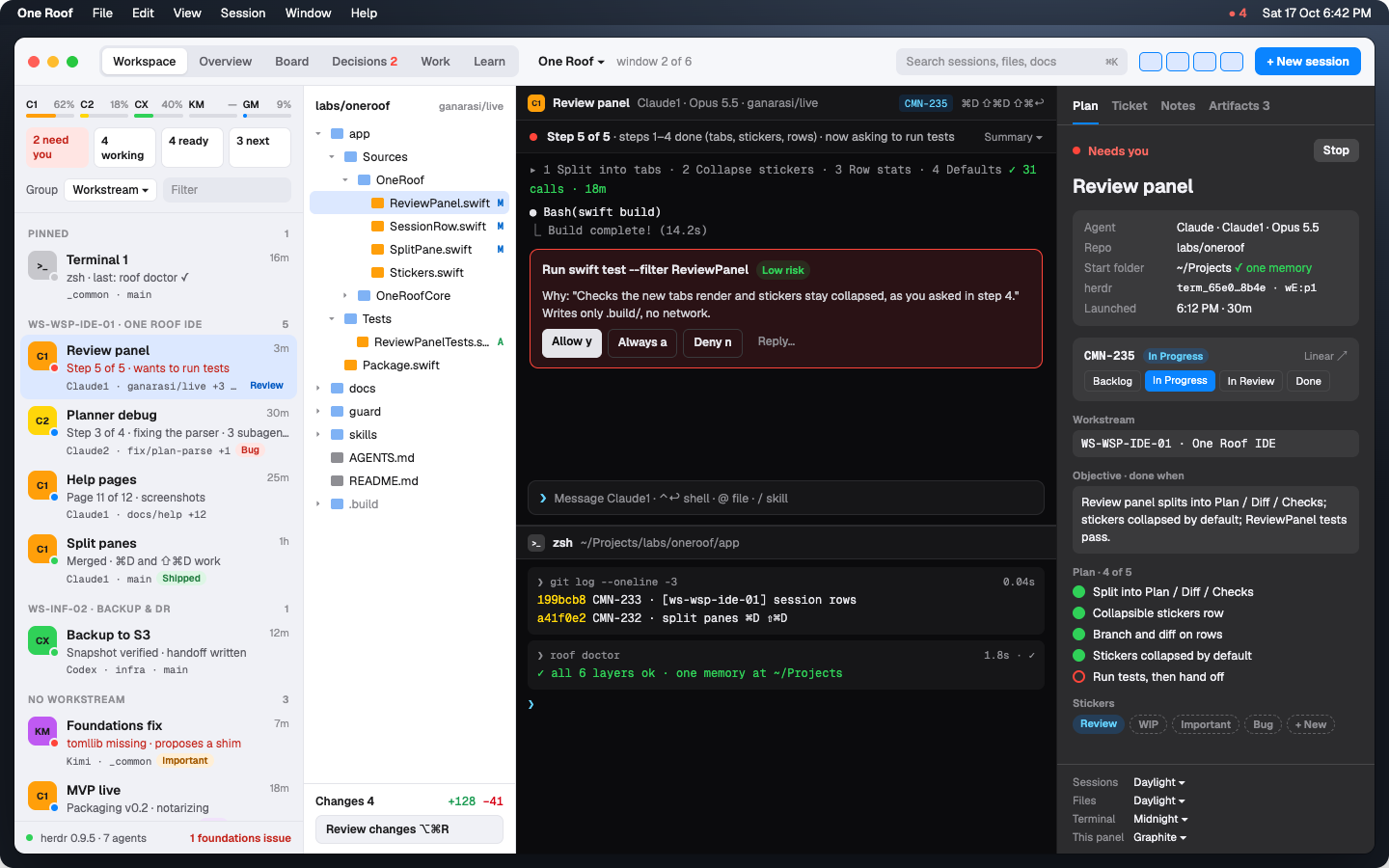
Still a real terminal, with each panel in its own theme.

Sessions, files, terminal and plan side by side, built on Ghostty's renderer, with ⌘D and ⇧⌘D to split panes. Agents keep running when you quit the app. Each panel can be light, mid-grey or dark on its own.

Workspace with four panels
Editor · Review changes

Edit, run and review without leaving.

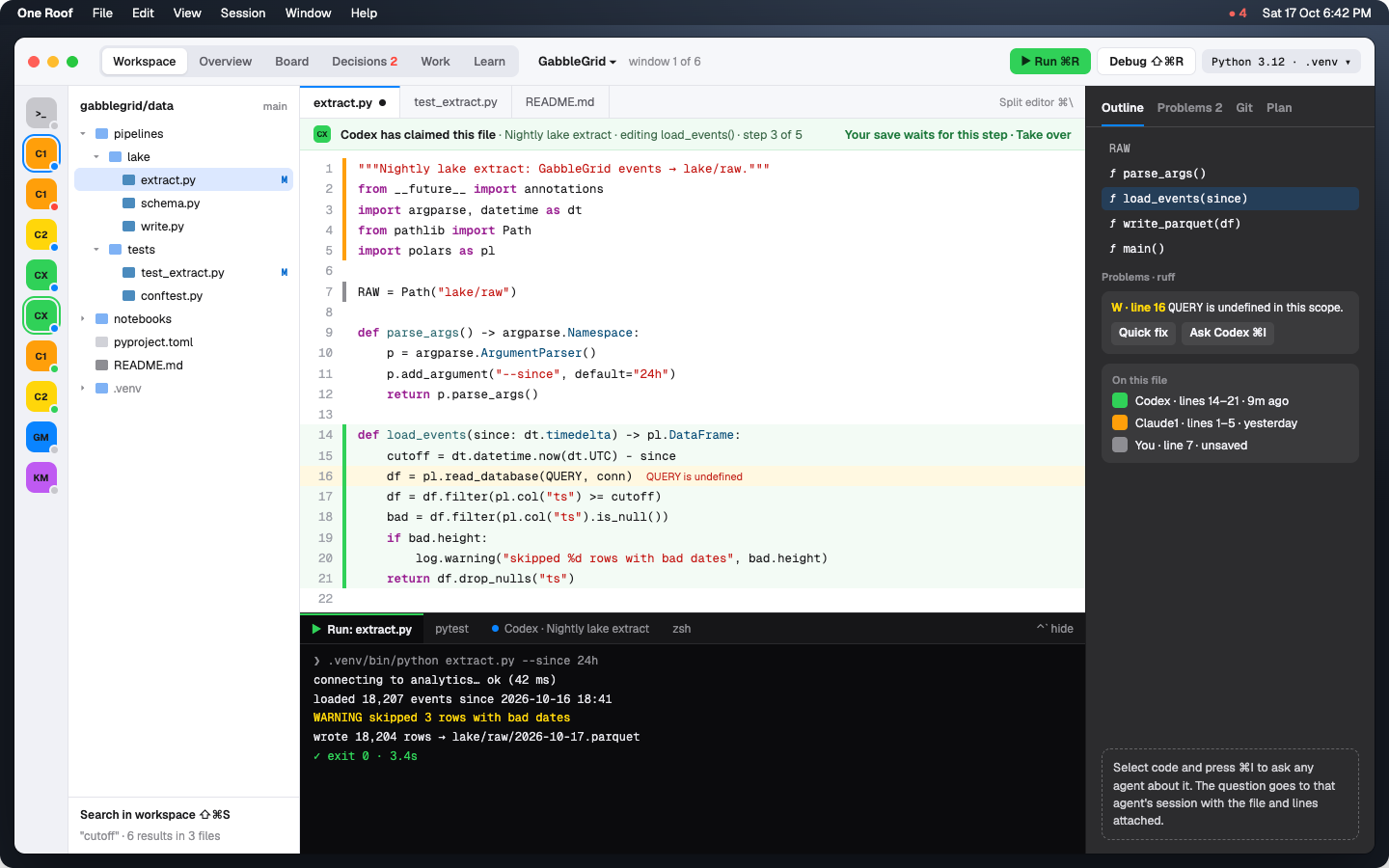
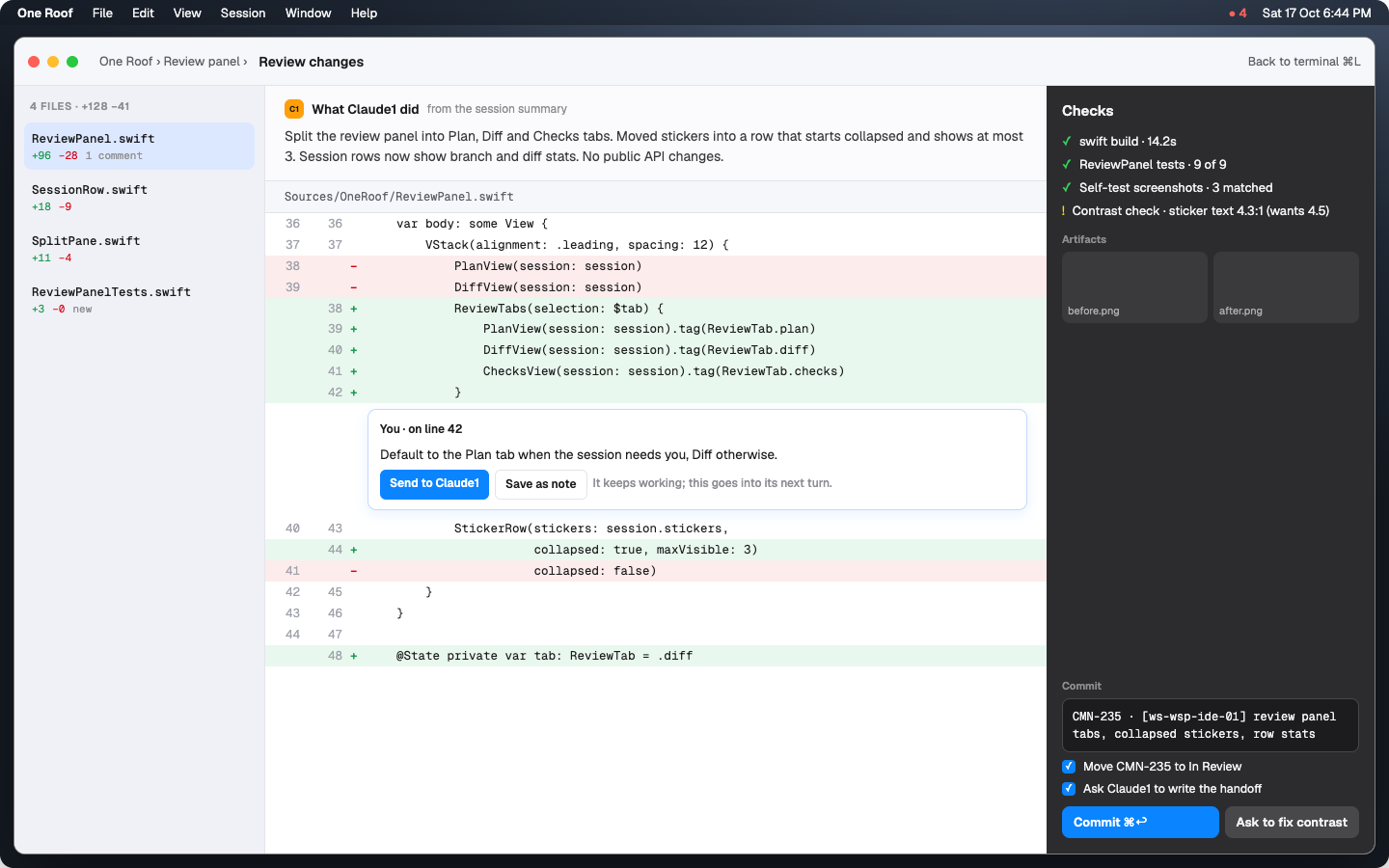
A light IDE: edit, ⌘R to run, ⇧⌘R to debug, with problems listed beside the code. Lines an agent changed carry its colour, and a file an agent is editing is marked as claimed. Review the diff, comment on a line to send it back to the agent, then commit.

Editor with run dock
Review changes
Work · Learn

Your roadmap and a coach, built in.

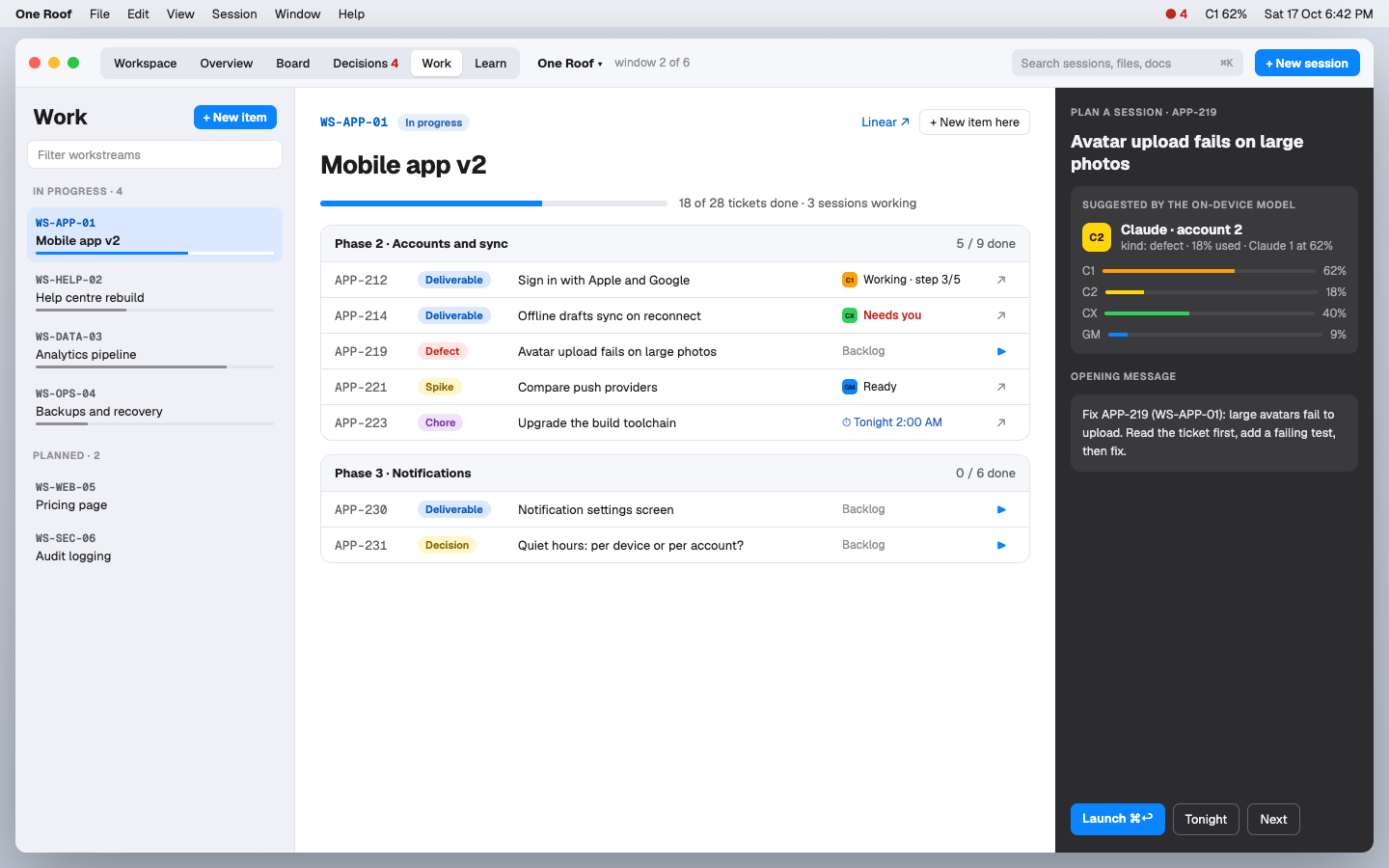
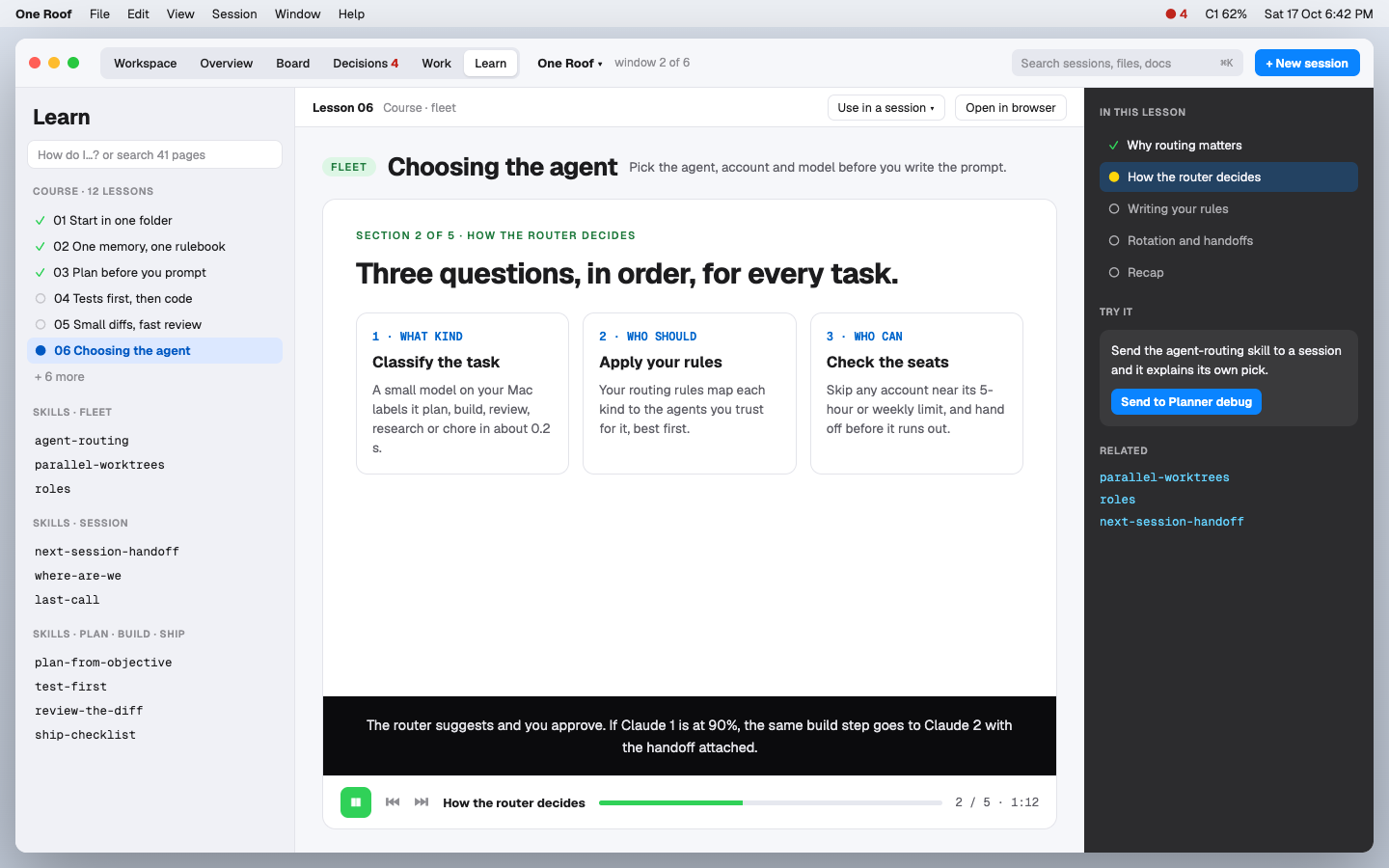
Work shows your workstreams and tickets by phase, with the session working on each one. Press ▶ on any ticket and the router suggests who should take it. Learn is an agentic-engineering coach: a 12-lesson narrated course and 17 starter skills. Listen in the app, or send a skill straight to a session.

Work: workstreams, tickets by phase, and the router's pick
Learn: the narrated agentic-engineering course
Install

One download. About two minutes.

Apple silicon · macOS 14+ · herdr · git · at least one agent CLI signed in

01

Download the app

Unzip and drag One Roof to Applications.

First launch: macOS 15+ System Settings › Privacy & Security › Open Anyway; macOS 14 right-click › Open.

DOWNLOAD .ZIP
02

Add your subscriptions

First launch finds the agents and signed-in accounts you already use and checks your setup.

brew install herdr
03

Start your first session

Press ⌘N and say what should happen. One Roof suggests the agent and account; you launch it.

⌘N new session · ⌘↩ launch
Build from source

Swift 6, Xcode 26. The README walks through the build. github.com/gaurav8936/oneroof

Underneath · the oneroof kit

One launch folder, one memory, one rulebook.

Agents only agree when they read the same rules and notes. Claude Code keys its memory on the folder you launch from: start in the wrong one and it quietly opens a second memory. We lost 26 notes that way in five weeks. The kit works from the command line, with or without the app.

git clone https://github.com/gaurav8936/oneroof ~/oneroof
~/oneroof/bin/roof install
roof doctor        # checks every layer, live
1Shell defaultA new terminal that opens in ~ moves to your workspace.
2Agent wrappersTyping claude, codex or kimi anywhere else moves you there first.
2bPATH stand-insAgents without hooks refuse to start outside the workspace.
3Claude hookBlocks every prompt while a Claude session is outside the workspace.
4Home notes~/CLAUDE.md and ~/AGENTS.md say "wrong folder, stop".
5Memory pinOne Claude memory, whichever folder you launch from.
The story · GabbleGrid blog

One workspace: the boring rules that made our agents agree

How one launch folder, one memory and one rulebook stopped five agents from drifting apart, and why the terminal around them had to change next.

READ THE POST ↗

Open source. Built for people who run a fleet.